It seems like there are a billion scammers out there trying to get my personal information or steal my hard-earned money. They already have a few of my email addresses, and one of my former physical addresses appears on a list. There are not a billion scammers, I hope; there are just enough of them to send out 100’s billions of spam emails, texts, and messages every single day.
Recently, I have been watching some scam-baiting videos. Scam baiters pose as victims in an attempt to waste the time and resources of scammers. Some scam baiters even hack the scammers’ operations in an attempt to warn potential victims before they get scammed. The idea is that if the scammer is busy trying to get money from the scam baiter, they are not engaged in scamming other potential victims. Here are a few things I have learned from watching these videos:
Kindly: The use of the word “kindly” in email, text, and messages. Example: Kindly click the link to start the process. Below is an email I got from a scammer. First, it came from someone I never did business with. Second, note they used “kindly’. Third, no punctuation. Fourth, it came from an icloud.com account and not a business account like amazon.com.
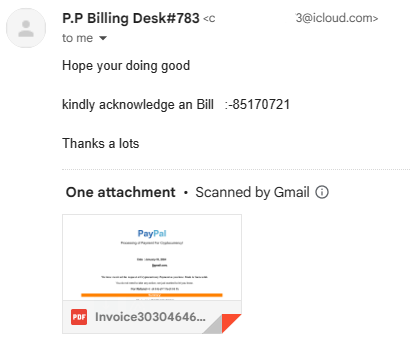
Gmail provided a preview what was in the document. I did not open the document, even though Google said they scanned it for malware. After zooming in by 300% I could see what the scammer claimed I purchased. It was Bitcoins. I reported the scammer to Apple by forwarding the email to reportphishing@apple.com.

Bitcoins and Gift Cards: If a Help Desk Support personnel or another business wants you to pay them in Bitcoins or Gift Cards, it is probably a scam. If you are dealing with a legitimate business, they are not going to ask you to pay them in gift cards.
Did someone insist you pay them with cryptocurrency?
Why Do Scammers Want Gift Cards?
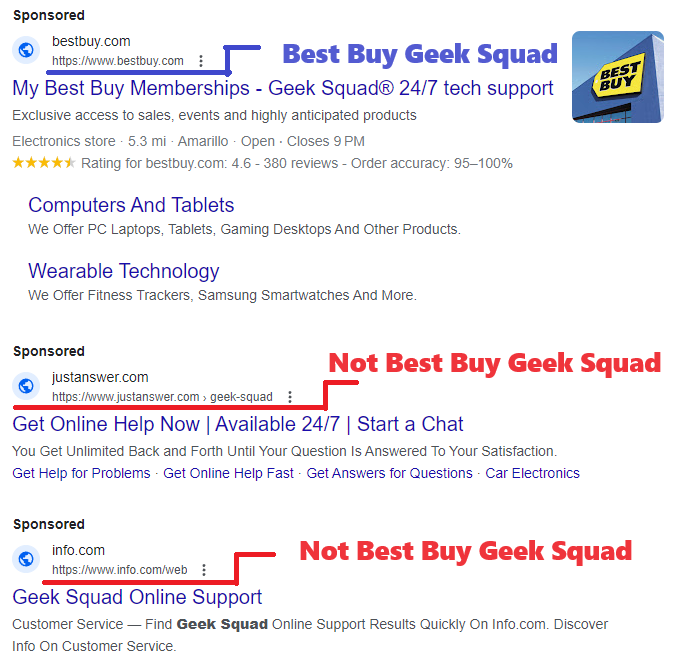
Sponsored Links: Google and Bing are proactive in shutting down scammers, but the scammers are creating fake webpages and are purchasing fake ads faster than these companies can shut them down. Yes, scammer buy ads just like legitimate companies. If I search for “Geek Squad” I will see Sponsored on Google and Ads on Bing. Both return several links that were not Best Buy’s Geek Squad. These non-geek squad links maybe legitimate companies, or they could be scammers.

Mailing Cash: If you are being asked to send a large amount of cash through the mail and are provided instructions on how to hide the cash inside books or other items, it is probably a scam. United States Postal Service and UPS both allows you to send cash as long as it is not for illegal purposes. There are scam warnings all over their websites about sending cash in the mail. FedEx does not accept any form of currency. If you are told to hide the currency, it is probably a scam.
Your Bank Calls: Scammers will ask you for the name of your bank and the bank’s phone number on the back of your card. Why, so their fellow scammer can spoof your bank’s phone number to call you pretending to be your bank. Once you are comfortable with talking with the fake scammer’s bank, they well attempt to get as much information about your bank account as possible; name, account number, passcode, PIN number and password. If this was a legitimate call from your bank or credit card company, they do not need your account information because they would already be looking at it.
Eight Things Your Bank Would Never Ask You
Checks: It is very easy to forge checks. The scammer will make out a fake check for an amount that is greater than the cost of the item. Then they will ask you to refund the money over the cost of the item. This is all done before you learn that you were given a fake check. Now they have the item and the money. If you are selling your car for $20,000 and they give you a check for $25,000, BEWARE!
Encouraging You: You are on the phone talking with someone who claims you won $1 million. To claim this money, you need pay the lawyer fees of only $500. They are claim these fees can be pay by gift cards, bitcoins, or an online transaction like Venmo and they are willing to walk you through the entire process. If you receive another call or text, they will tell you not to answer the call or read the text, because your phone has been hacked and it is scammers trying to contact you. They will tell you not to talk with anyone, not the store manager, not the bank teller, not a family member. They will not let you off the phone until the money is transferred to them. They will tell you if someone ask what you are doing lie to them and tell them you are trying to help a friend or family member.
Job Opportunity: Scammer will pose as recruiting managers to obtain your personal information or to get money. If recruiter ask you for money, WARNING! it may be a potential scammer. If a recruiter contacts you, check out the company they claim to work for or the company they claim to represent. A scammer will create their own webpage just to scam as many people as possible. If a recruiter contacts you, and claim they work for Big Tech Industries, and give you the URL of iBigTechInd.com but you search the web and find the URL for Big Tech Industries is BigTechInd.com another warning sign of a potential scammer.
Scammers also recruit individuals to receive money, asking them to send it to someone else or convert the funds into Bitcoin or Gift Cards. Unfortunately, these victims unwittingly become Money Mules. Engaging in such activities is illegal, and participation could lead to imprisonment.
Web Pages: Scammers create deceptive web pages with the sole intention of defrauding as many people as possible. Frequently, they steal pages from legitimate companies and replicate them for their malicious purposes. If you encounter broken links on a company’s website or forms that cannot be submitted, it may be an indication that the website is fake
How to Identify a Fake Website
Image Search: Google’s and Microsoft’s image search is a great tool for identifying scammers. If you are suspicious of a website, do an image search to see how many websites uses the same pictures. Is the CEO’s picture just a stock photo, or does it appear on another website? Is the image of that puppy which is for sale, or the image of the dog that is in dire need for help, located on multiple websites? Probably a scam.
Pictures: Never send your pictures, whether naughty or nice, to someone you’ve met online. Extortionists often invest time in building a connection, pretending to be your friend, before requesting a photo. If you send a compromising picture, they may use it for blackmail. Even if you send a harmless photo, they might manipulate it by placing your head on a compromising image and then use it for extortion. If someone gets upset because you refuse to share a picture, remember that they are not your true friend.
Junk Mail: Currently, one of my email addresses Junk Mailbox has over 1400 emails. Yes, some of them are legitimate, but over half of them are scams. Some of the email claims I purchased something and want me to call them to get a refund. Some actually has threaten to wipe my device if I do not pay them in Bitcoins. Here are a few ways, I easily identify scam emails:
- Flagged as Important – thank you scammers – you have made it easy for me to identify your emails and report them as phishing.
- Memberships I Never Had - Scammer like to send emails for streaming services I never had.
- Wrong Email Address – I have multiple email addresses. One for each aspect of my life; Business, Bills, Financial, Shopping, Friends and Family… each has its own. So, if I get an email from Amazon and it came to the wrong email address. It’s probably a scam.
- Emails not containing the companies URL. Why would Lowes hire extradegree.co to send out emails for them? They would not!
- Emails not addressing me by my name. They are using part of my email address. Or, emails address to the wrong person.

Most of these tips came from watching Pleasant Green’s YouTube channel. He has numerous videos on exposing scammers. Check out his videos. If you would rather read about scams, there are links throughout this post about identifying scams.
Like the scam baiter say, “Being knowledgeable is the best defense against scams.”



 Sarah Cath's Adventures