A funny, not so funny thing happened to me today. Most of the posts I make to Facebook are reserved for Friends and Family, but I linked my “Identifying Scams” blog post on Facebook and made it public because knowledge is the best key to preventing scams. Someone actual commented on it. ”Yay!” They want to be my friend because they are lonely. “Boo!”
Do not! Do not! Do not! Fall for this! Yes, it could be a lonely guy. It is probably a scam. There are two main scam reasons this person wants to be my friend.
1) To get access to my profile and friends list so he can scam my friends.
2) Sextortion – Scammers will spend a long time becoming your friend, and once you are comfortable being their friend, they ask you to send them a picture either naughty or nice. Don’t send pictures! They will try to extort money from you. They will threaten you, your friends, and your family if refuse to pay.
This comment is a clear example how sextortion can start.
I blocked out their picture to protect the real person, just in case the real person’s Facebook page was stolen. I did check out their Facebook profile. Friends “No Following to show.” Posts to their page, only went back for 5 days.
What actions did I take? I hid their response to my post and blocked them. Facebook really wants to make sure that you really want to block someone.
Today, I commented on an article that showed up on my Facebook feed, and someone commented back wanting to be my friend.
Well at least this person didn’t comment on my post about “Identifying Scams.” Their Facebook page only went back 2 days. Their friends also had “No Following to show.” When I did an image search for their pictures, it was a little creepy. There were so many people that resemble this person.
I hid their comment and blocked them too. People who put that many emojis in a comment, deserves to be blocked.
Protect yourself, protect your kids, protect your parents, against this type of scam. I know there are a lot of very lonely people in the world, but there are better ways to make friends. People engage in sextortion are some of the worst types of scammers in the world.
It seems like there are a billion scammers out there trying to get my personal information or steal my hard-earned money. They already have a few of my email addresses, and one of my former physical addresses appears on a list. There are not a billion scammers, I hope; there are just enough of them to send out 100’s billions of spam emails, texts, and messages every single day.
Recently, I have been watching some scam-baiting videos. Scam baiters pose as victims in an attempt to waste the time and resources of scammers. Some scam baiters even hack the scammers’ operations in an attempt to warn potential victims before they get scammed. The idea is that if the scammer is busy trying to get money from the scam baiter, they are not engaged in scamming other potential victims. Here are a few things I have learned from watching these videos:
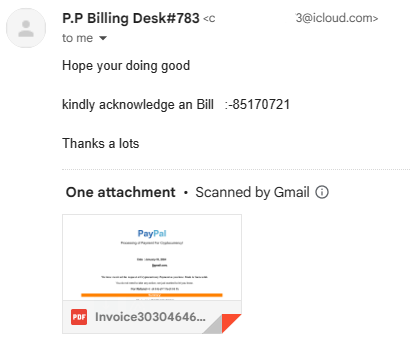
Kindly: The use of the word “kindly” in email, text, and messages. Example: Kindly click the link to start the process. Below is an email I got from a scammer. First, it came from someone I never did business with. Second, note they used “kindly’. Third, no punctuation. Fourth, it came from an icloud.com account and not a business account like amazon.com.
Gmail provided a preview what was in the document. I did not open the document, even though Google said they scanned it for malware. After zooming in by 300% I could see what the scammer claimed I purchased. It was Bitcoins. I reported the scammer to Apple by forwarding the email to reportphishing@apple.com.
Bitcoins and Gift Cards: If a Help Desk Support personnel or another business wants you to pay them in Bitcoins or Gift Cards, it is probably a scam. If you are dealing with a legitimate business, they are not going to ask you to pay them in gift cards.
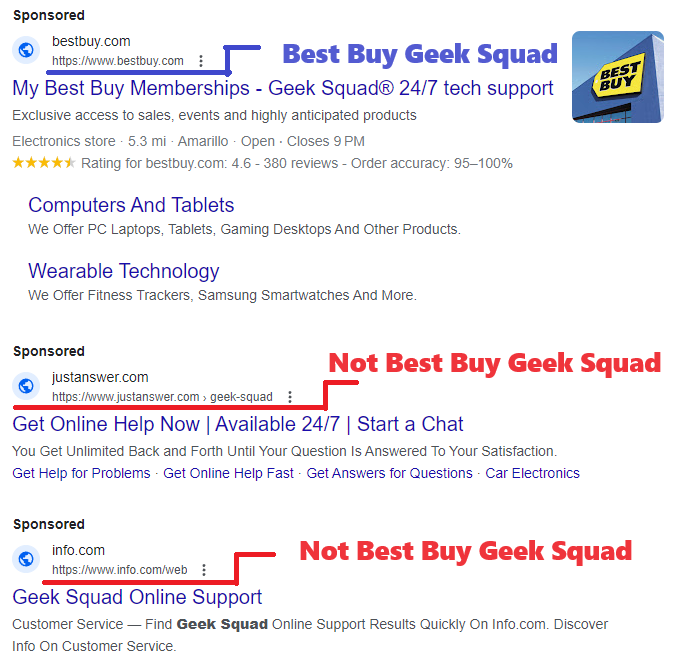
Sponsored Links: Google and Bing are proactive in shutting down scammers, but the scammers are creating fake webpages and are purchasing fake ads faster than these companies can shut them down. Yes, scammer buy ads just like legitimate companies. If I search for “Geek Squad” I will see Sponsored on Google and Ads on Bing. Both return several links that were not Best Buy’s Geek Squad. These non-geek squad links maybe legitimate companies, or they could be scammers.
Mailing Cash: If you are being asked to send a large amount of cash through the mail and are provided instructions on how to hide the cash inside books or other items, it is probably a scam. United States Postal Service and UPS both allows you to send cash as long as it is not for illegal purposes. There are scam warnings all over their websites about sending cash in the mail. FedEx does not accept any form of currency. If you are told to hide the currency, it is probably a scam.
Your Bank Calls: Scammers will ask you for the name of your bank and the bank’s phone number on the back of your card. Why, so their fellow scammer can spoof your bank’s phone number to call you pretending to be your bank. Once you are comfortable with talking with the fake scammer’s bank, they well attempt to get as much information about your bank account as possible; name, account number, passcode, PIN number and password. If this was a legitimate call from your bank or credit card company, they do not need your account information because they would already be looking at it.
Checks: It is very easy to forge checks. The scammer will make out a fake check for an amount that is greater than the cost of the item. Then they will ask you to refund the money over the cost of the item. This is all done before you learn that you were given a fake check. Now they have the item and the money. If you are selling your car for $20,000 and they give you a check for $25,000, BEWARE!
Encouraging You: You are on the phone talking with someone who claims you won $1 million. To claim this money, you need pay the lawyer fees of only $500. They are claim these fees can be pay by gift cards, bitcoins, or an online transaction like Venmo and they are willing to walk you through the entire process. If you receive another call or text, they will tell you not to answer the call or read the text, because your phone has been hacked and it is scammers trying to contact you. They will tell you not to talk with anyone, not the store manager, not the bank teller, not a family member. They will not let you off the phone until the money is transferred to them. They will tell you if someone ask what you are doing lie to them and tell them you are trying to help a friend or family member.
Job Opportunity: Scammer will pose as recruiting managers to obtain your personal information or to get money. If recruiter ask you for money, WARNING! it may be a potential scammer. If a recruiter contacts you, check out the company they claim to work for or the company they claim to represent. A scammer will create their own webpage just to scam as many people as possible. If a recruiter contacts you, and claim they work for Big Tech Industries, and give you the URL of iBigTechInd.com but you search the web and find the URL for Big Tech Industries is BigTechInd.com another warning sign of a potential scammer.
Scammers also recruit individuals to receive money, asking them to send it to someone else or convert the funds into Bitcoin or Gift Cards. Unfortunately, these victims unwittingly become Money Mules. Engaging in such activities is illegal, and participation could lead to imprisonment.
Web Pages: Scammers create deceptive web pages with the sole intention of defrauding as many people as possible. Frequently, they steal pages from legitimate companies and replicate them for their malicious purposes. If you encounter broken links on a company’s website or forms that cannot be submitted, it may be an indication that the website is fake
Image Search: Google’s and Microsoft’s image search is a great tool for identifying scammers. If you are suspicious of a website, do an image search to see how many websites uses the same pictures. Is the CEO’s picture just a stock photo, or does it appear on another website? Is the image of that puppy which is for sale, or the image of the dog that is in dire need for help, located on multiple websites? Probably a scam.
Pictures: Never send your pictures, whether naughty or nice, to someone you’ve met online. Extortionists often invest time in building a connection, pretending to be your friend, before requesting a photo. If you send a compromising picture, they may use it for blackmail. Even if you send a harmless photo, they might manipulate it by placing your head on a compromising image and then use it for extortion. If someone gets upset because you refuse to share a picture, remember that they are not your true friend.
Junk Mail: Currently, one of my email addresses Junk Mailbox has over 1400 emails. Yes, some of them are legitimate, but over half of them are scams. Some of the email claims I purchased something and want me to call them to get a refund. Some actually has threaten to wipe my device if I do not pay them in Bitcoins. Here are a few ways, I easily identify scam emails:
Flagged as Important – thank you scammers – you have made it easy for me to identify your emails and report them as phishing.
Memberships I Never Had - Scammer like to send emails for streaming services I never had.
Wrong Email Address – I have multiple email addresses. One for each aspect of my life; Business, Bills, Financial, Shopping, Friends and Family… each has its own. So, if I get an email from Amazon and it came to the wrong email address. It’s probably a scam.
Emails not containing the companies URL. Why would Lowes hire extradegree.co to send out emails for them? They would not!
Emails not addressing me by my name. They are using part of my email address. Or, emails address to the wrong person.
Most of these tips came from watching Pleasant Green’s YouTube channel. He has numerous videos on exposing scammers. Check out his videos. If you would rather read about scams, there are links throughout this post about identifying scams.
Like the scam baiter say, “Being knowledgeable is the best defense against scams.”
No not the luncheon meat, but hackers. People wanting to get a hold of your data to cause you harm.
Occasionally, I looked through my junk mail and report the spammer. Today, there was one spammer that announced from the very first word they were a spammer. Here is the heading of the email.
Do you see the problem with it? Okay, I did highlight it. Amazon never ever refers to anyone as “Dear”. They are always blunt and to the point. Also, that red exclamation mark is another indicator. I did open the email (shame on me) to see how many times the spammer announced they were a spammer.
My name is not SARAHCATH.
What is “Command n & deg”? – probably something they forgot to program.
Appears they can not type in Mixed Case.
Oh, what is up with that date “Today , 2023.04.02 -“
“Your commands” – missed something else in the program.
This was my giggle for the day. Giggle, giggle, giggle.
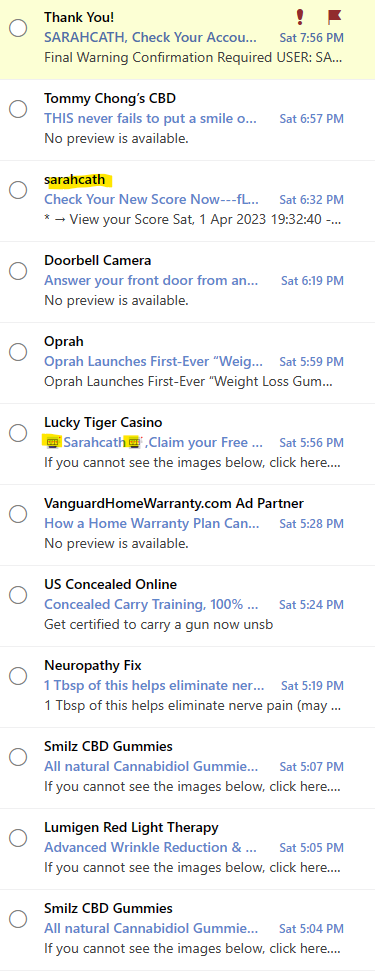
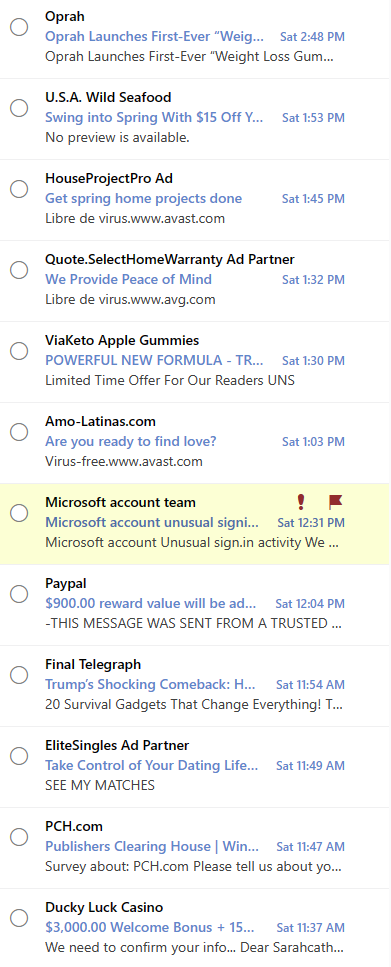
Seriously, the majority of my junk mail is from spammers. A small percent is actually from businesses I have contacted in the past. Below are just a few of the emails I have received from spammers.
How do I know they are spam without even opening the emails?
Most of the companies listed I have never done business with.
Again, my name is not SarahCath
If is highlighted it is spam.
If it has a cute little character or text, treat it like spam.
Ad Partner – spam – someone pretending to be someone else.
You may wonder why I consider the apparent email from Paypal and Microsoft Account Team to be spam. Simple explanation; Paypal is not affiliated with this account. Now, the Microsoft look legit, however…
I have two-factor identification setup on my Microsoft account. But, I wanted more security on this account, so I set up the Microsoft Authenticator. It will notify me anytime someone tries to log onto my account, and I can deny their access. I can approve my access, if I am trying to log into the account from a different device. I no longer receive these emails from Microsoft, and if I did it would go directly to my inbox.
During the last week, there has been 14 attempts, from all over the world, to sign into my Microsoft account. They were all stopped from the start because they were attempting to use a very, very old password.
Regularly I get unsolicited phone calls, those are easy to handle. I normally don’t answer calls whose contact information is not in my phone. On rare occasions when I answer the phone, I found the best thing I could tell them is “I don’t do business with people who randomly calls me on the phone.”
Text messages (SMS messages) are a different story, they will appear on my phone solicited or unsolicited. Below is a recent, scam text message I received. They are trying their best to get me the click the URL link.
I will step you through the problems I found with this text message.
Most legitimate companies I deal with does not use a real phone number. They are now using a 5-digit code like “59842” to send text. Also, the text message used the country identifier “+1” for the USA. Lastly, this number was not in my address book.
Have you ever heard of NRSC Poll? They may be a legit company. If you want to fill out a survey, search for NRSC Poll and see the results. If they ask for any personal info, be cautious.
The text message provided a deadline which you must respond quickly? Probably because the hacker knows that this domain has a limited life.
Do we talk like the example in the text message? “Quick vote!” We aren’t voting, it’s a poll.
Let check out the domain! First, item 2. said it was an NRSC poll. Why doesn’t the URL contain “NRSC”?
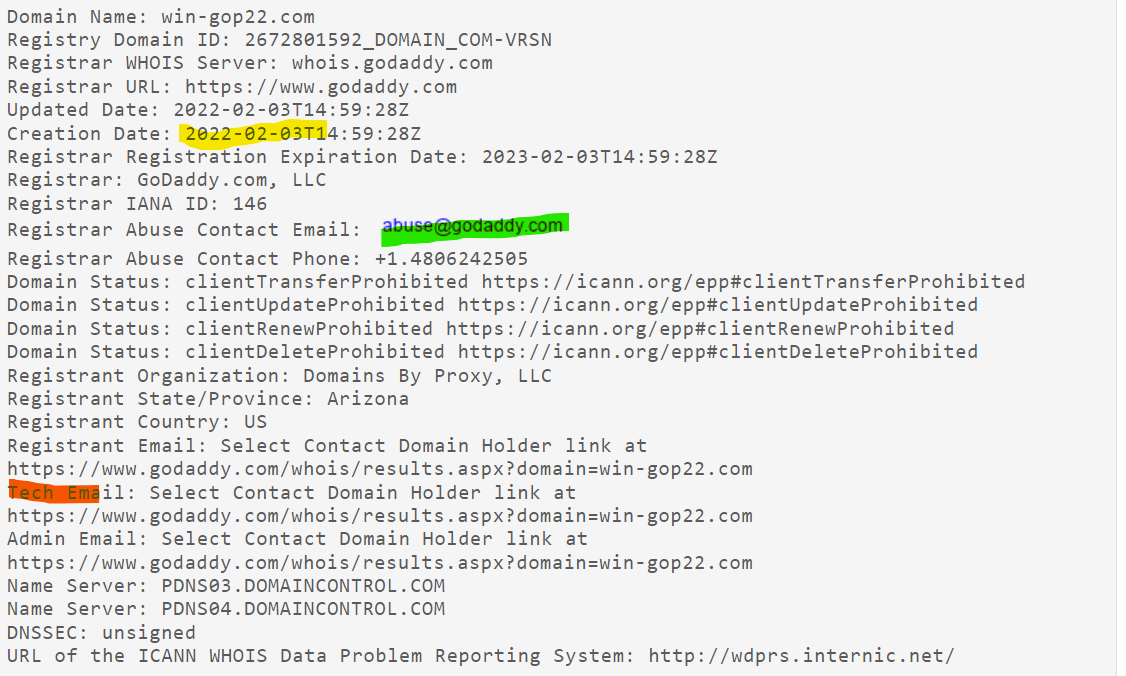
To check out domains, I use https://whois.domaintools.com/. Type the domain into the search box and press Search. Example: win-gop22.com. When I followed these steps for this domain, I found suspicious items:
Yellow highlight: The domain was created on the same day the text message was sent. This is suspicious.
Red highlight: The domain’s registrant information was redacted for privacy. Why would a legitimate company or organization need privacy? Very suspicious.
An email is provided (Green Highlight) where you can report abuse. It is different for every domain. You can’t report abuse to Godaddy if WordPress is the domain registrar. Godaddy has form to report abuse on their website: https://supportcenter.godaddy.com/AbuseReport?
Here is the text of the original text of the message. I want the search engines around the world to be able to index this page to warn other of scams:
NRSC LIVE POLL: BIDEN-HARRIS APPROVAL. We want to hear your thoughts on the DISASTROUS Biden-Harris Administration. All responses are due by MIDNIGHT. Take action RIGHT NOW, so your voice is heard. Quick vote! http://win-gop22.com/x6bpdNA
Text STOP to END
Below is another text I received on my phone. Yes, I believe that hackers have my phone number from the Dark Web. How? There are numerous companies that have my contact information and a several of the larger companies had data breaches, such as T-Mobile, CafePress, LinkedIn, Android, Facebook… Those were just in 2021.
+1 (386) 297-5094
Message from Donald Trump Jr. -> I can't lie to you guys. This election is going to be a tough one so it is REALLY important we hear from you. We need you to take the Official 2022 Nationwide Census. Take 2 mins and get it done: https://winitback2022.org/r.wr?id=JW0FCe4l

ReplySTOPToEnd
This is why I believe it is a scam:
The phone number: It a phone number, not a 5 digits text number. It has a +1 in from of the number. And, when I looked up the number it did not return a legitimate organization.
The web site “winitback2022.org” was created on December 23, 2021.
The web site is hosted by GoDaddy. Okay, that makes it appear to be more legitimate. But, the domains registrant’s contact information has been withheld.
The domain was registered by: Domains By Proxy, LLC. If you look them up, you will find they have a very bad rating with the BBB (Better Business Bureau).
Finally, there no Official 2022 Nationwide Census. The only official Census takes place every 10 years; 2000, 2010, 2020, 2030….
Again, don’t click any link in a text message. Don’t reply to a text message.
Below is a text I received on Christmas Eve, and it is a scam! Either they were phishing for information or worst:
+1 (402) 378-1378
Parcel Tracking: Hi, your package with tracking number ZZBURAHH is waiting for you to check the shipment address: spreadbrief.com/DemUgCq
It looked like it could have been legit with the a few problems:
I never get text message starting in +1. I believe that to use +1 the message was probably sent from another country.
I never seen a tracking number like “ZZBURAHH”. Personally, to me it sounds like “Brouhaha”
I was only expecting packages from UPS or USPS.
First, I did a web search on the number. The results did not return any legitimate businesses. If a legit company was going to text me, I would expect to find their business on the web searching by their phone number.
Next I used WHOIS to look up the domain and I found problems:
The domain was created the same day the text was sent.
The domain owner was in another country.
Most of the contact information on the domain was redacted for privacy. If you look at a legit company’s domain registration, such as UPS, they provide a mailing address and phone number.
Lastly, I emailed the text to myself and reported it to the domain provider. On WHOIS an email address is provided to report abuse.
Recommendation: Never click on a link you receive in a text or email.
Request from US Census Bureau: Respond to important survey on COVID-19 crisis. https://covid.census.gov…. Reply STOP to cancel. Text HELP for more info.
Do not click the link, do not respond STOP or HELP. It is a scam!







 Sarah Cath's Adventures